
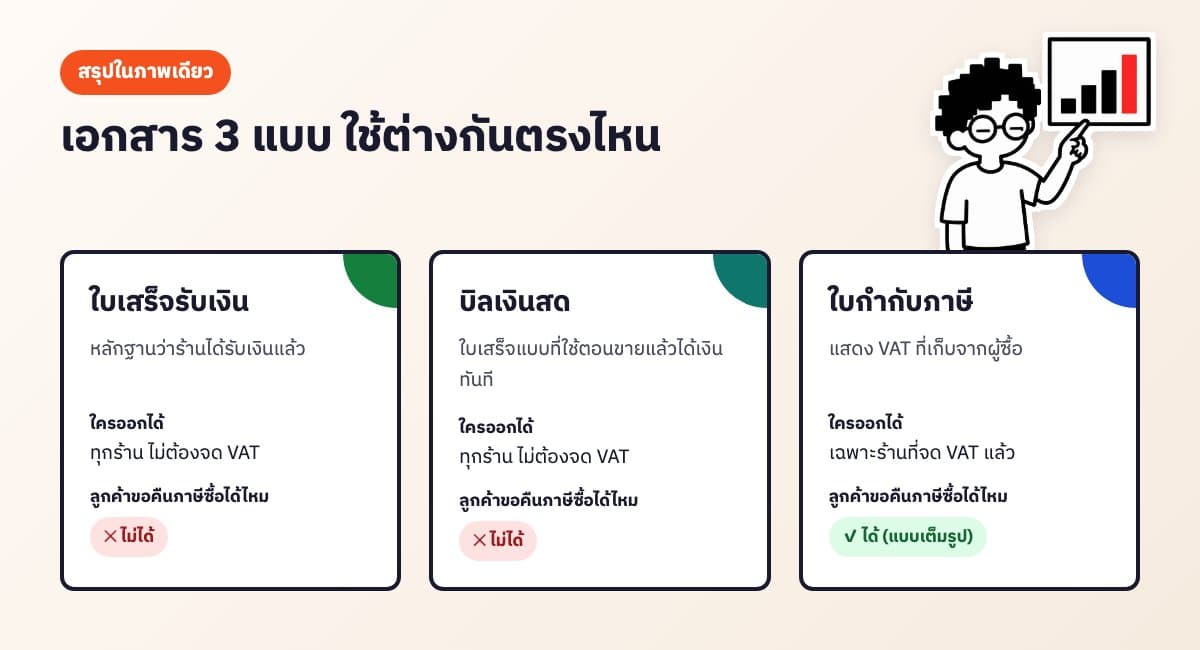
A receipt is proof that the shop has been paid, and anyone who sells can issue one. A cash bill is a receipt used when you get paid on the spot. A tax invoice, however, can only be issued by a shop registered for value added tax (VAT). In Thailand, a shop that is not VAT-registered can only issue receipts or cash bills.
Key takeaways
Show summaryHide
- Anyone who sells can issue receipts and cash bills — no VAT registration needed
- Only VAT-registered shops can issue tax invoices (registration is required once revenue exceeds 1.8 million baht a year)
- A full tax invoice must include all 8 items listed in Section 86/4 of the Thai Revenue Code
- Document numbers must run in sequence with no duplicates, and the amount in figures must match the amount in words
- Create receipts, cash bills or tax invoices as PDFs for free with our receipt maker
What is a receipt?
A receipt (ใบเสร็จรับเงิน) is a document the seller gives the buyer to confirm that payment has been received. Both individuals and companies can issue one, and VAT registration is not required. Business customers often ask for one as evidence for booking expenses.
A good receipt should include at least the following:
- The shop's name and address (the payee) and a contact number
- A document number that runs in sequence with no duplicates, and the date of issue
- The buyer's name (if the customer asks)
- Items, quantities, unit prices and the total
- The amount in both figures and words, e.g. 1,250 baht (one thousand two hundred fifty baht only)
- Payment method, e.g. cash or bank transfer
- Signature of the person receiving the payment
Is a cash bill different from a receipt?
In practice there is hardly any difference. A cash bill (บิลเงินสด) is a receipt used when you sell and get paid immediately (cash sales). It is usually a short form with the items, the amount and the payee's signature. Shops that receive a transfer before shipping can use it too, since the money has been paid in full when the document is issued.
One thing to watch: a cash bill is not a tax invoice, so the customer cannot use it to claim input VAT.
How to write a cash bill, step by step
- Header — the shop's name, address and phone number (a logo is optional)
- Number and date — continue from the previous bill, e.g. CB-0012 after CB-0011
- Customer name — add it if the customer asks or if you are selling to a company
- Items — product name, quantity, unit price and line total for each line
- Total — subtract any discount, then write the net amount in figures and words
- Payment method — cash or transfer (state the bank and transfer date)
- Sign as the payee and keep a copy of every bill at the shop
Free tool, no sign-up
Online Receipt Maker
Don't want to write by hand? Use our online receipt maker: fill in the fields and get a cash bill as a PDF instantly, with the amount in words worked out for you.
Use the free toolWhich receipt do you issue for a bank transfer?
A receipt for a customer who paid by transfer is simply a regular receipt — there is no special document type. Just state the payment method as "bank transfer" along with the bank name and transfer date. The transfer slip is the customer's evidence; the receipt is the shop's confirmation that the money has been received.
What is a tax invoice, and who can issue one?
A tax invoice (ใบกำกับภาษี) is a document issued by a VAT-registered business to show how much value added tax was charged to the buyer. A VAT-registered buyer can use it to claim input VAT. In Thailand a shop must register for VAT once its revenue exceeds 1.8 million baht a year. If you are not registered, you must not issue tax invoices.
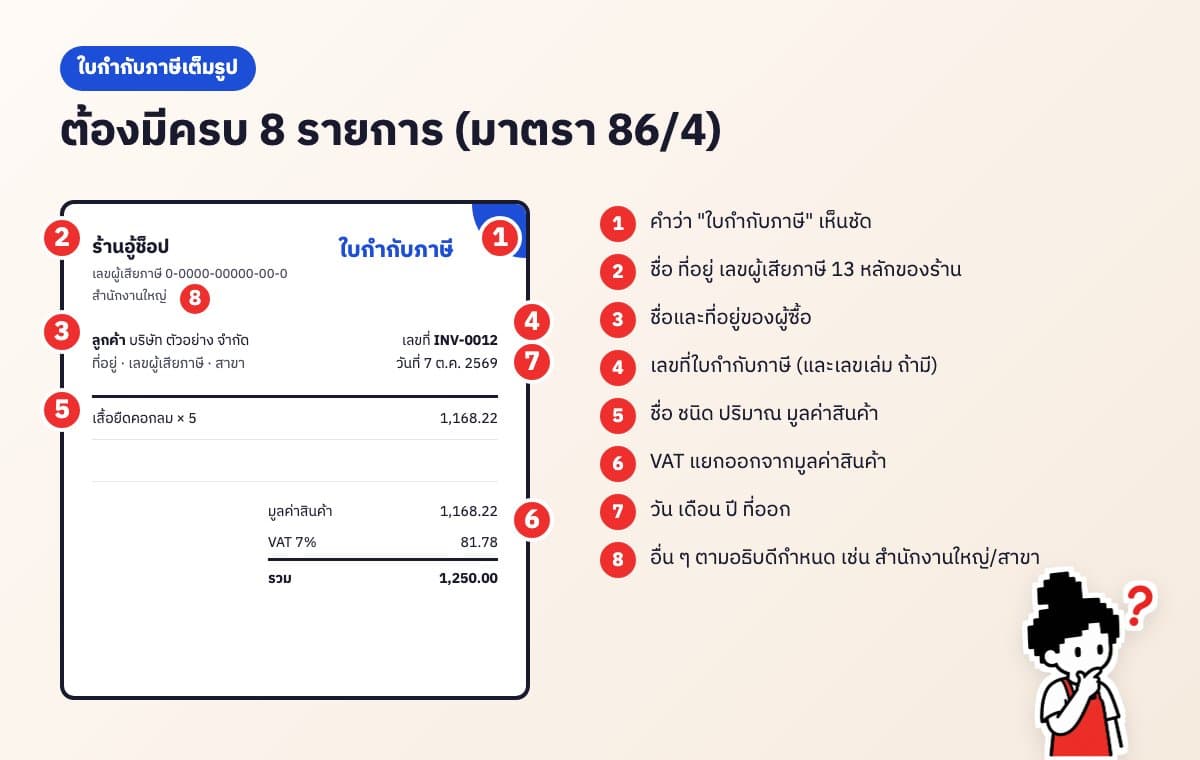
A full tax invoice must contain the items set out in Section 86/4 of the Thai Revenue Code, namely:
- The words "tax invoice" (ใบกำกับภาษี) in a prominent place
- The seller's name, address and 13-digit taxpayer identification number
- The buyer's name and address
- The tax invoice number (and book number, if any)
- The name, kind, category, quantity and value of the goods or services
- The amount of VAT, shown clearly separate from the value of the goods
- The date of issue
- Other details required by the Director-General, such as the seller's head office or branch number and the taxpayer ID of a VAT-registered buyer
An abbreviated tax invoice is used for retail sales where the buyer's name isn't needed, but the buyer cannot use it to claim input VAT. If the customer is a company asking for a tax invoice, always issue a full one.
If you want to send tax invoices as files instead of paper, you must follow the Thai Revenue Department's e-Tax Invoice system. If you haven't joined it yet, print the tax invoice and send it on paper.
Which documents should an online shop issue?
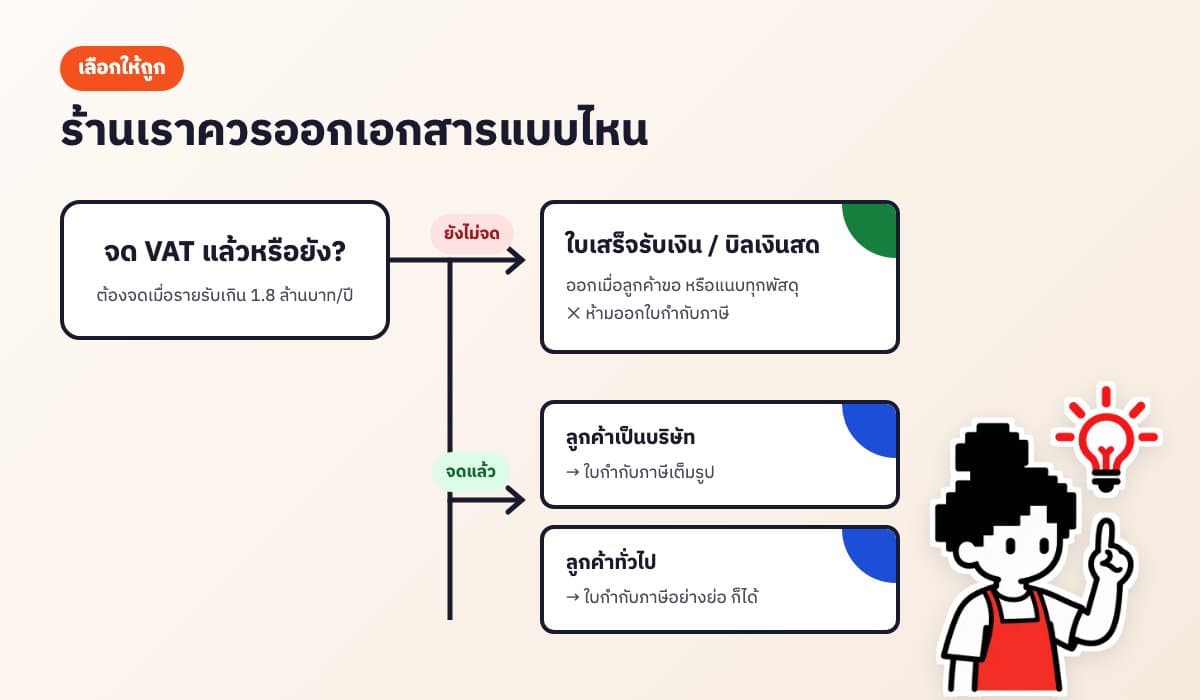
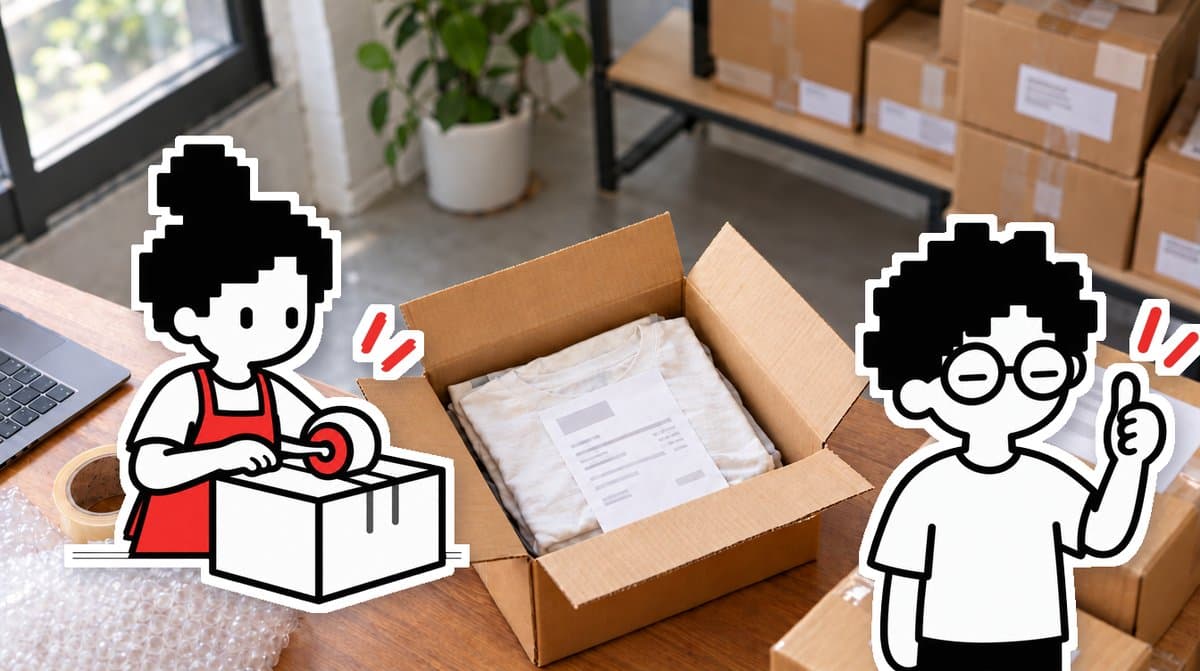
- Not VAT-registered: issue a receipt or cash bill when the customer asks, or include one with every parcel
- VAT-registered, regular customers: an abbreviated tax invoice, or a combined receipt/tax invoice in one document
- VAT-registered, business customers: a full tax invoice with the customer's name, address, taxpayer ID and branch
Not sure about your shop's tax position? Ask an accountant or the Thai Revenue Department (call 1161), especially when your revenue is getting close to 1.8 million baht a year.
Common mistakes
- Duplicate or skipped document numbers — makes later checks difficult. Number every document in sequence; void spoiled ones and keep them rather than throwing them away
- Figures and words don't match — check every time, or use a tool that converts the amount for you
- A shop that isn't VAT-registered adds 7% VAT or calls its document a tax invoice — not allowed
- Crossing out and correcting numbers — some customers won't accept it. Void the original and issue a new one
- Not keeping copies — VAT-registered shops must keep reports and supporting documents for at least 5 years
Free PDF receipts, no sign-up
Free tool, no sign-up
Online Receipt Maker
Use AooCommerce's online receipt maker for free. Choose a receipt, cash bill or tax invoice, enter your shop details once and they're remembered next time. VAT and the amount in words are calculated for you, and you can download the PDF straight away.
Use the free toolIf you issue documents every day for orders from Shopee, Lazada, TikTok Shop or chat, AooCommerce's document system creates receipts and tax invoices straight from the order, pulling in customer details so you don't have to retype them.
Frequently asked questions
Can an individual issue a receipt?+
Yes. A receipt is proof of payment, and anyone who sells can issue one — you don't need to register a company or register for VAT first.
Can a shop that isn't VAT-registered issue a tax invoice?+
No. Only VAT-registered businesses can issue tax invoices. Shops that aren't registered should issue a receipt or cash bill instead.
Is a cash bill different from a receipt?+
In practice they are interchangeable. A cash bill is a receipt issued when you sell and get paid immediately. Neither is a tax invoice, so neither can be used to claim input VAT.
A customer wants a full tax invoice. What details do I need from them?+
The company or buyer's name, address, 13-digit taxpayer ID, and whether it is the head office or which branch number.
What receipt do I issue when a customer pays by transfer?+
Issue a regular receipt and state the payment method as bank transfer, with the bank name and transfer date. There is no special document for transfers.
Does a receipt need a signature?+
It should have the payee's signature to confirm the shop has actually received the money. Business customers often ask for it.
I made a mistake on a receipt. How do I fix it?+
Don't cross it out. Void the original (keep it, don't throw it away) and issue a new one with the next number.
Is there a free receipt maker?+
Yes. AooCommerce's online receipt maker is free with no sign-up, and creates receipts, cash bills and tax invoices as PDF files at aoocommerce.com/tools/receipt.
Let the system run the back office. You go relax.
AooCommerce brings chats, orders and stock from every channel together. Sign up free — no card needed.