

Stock is the quantity of goods the shop actually has on hand right now. Stock management means always knowing how many of each item are left, where they are and when to reorder. There are two goals: don't sell what you don't have (stockouts), and don't hold items that won't sell for too long (dead stock).
Key takeaways
Show summaryHide
- Every sales channel should show "available-to-sell stock" = on-hand stock − items ordered but not yet shipped
- Reorder point = average daily sales × days waiting for stock + safety stock
- Give every colour/size its own SKU and record every movement in and out — never just overwrite the numbers
- Do physical counts on a cycle, counting bestsellers and high-value items more often
- Selling on several channels while deducting stock by hand = risk of overselling. Use a system with one central stock
Why stock goes wrong more easily for online shops than physical stores

Most online shops sell on several channels at once, such as Shopee, Lazada, TikTok Shop and LINE or Facebook chat. The same item has its quantity set separately in each place. Sell one on one channel, forget to reduce it on another, and you end up overselling: you have to cancel the order, the customer is disappointed, and some marketplaces even count it against your shop's rating.
3 terms worth knowing
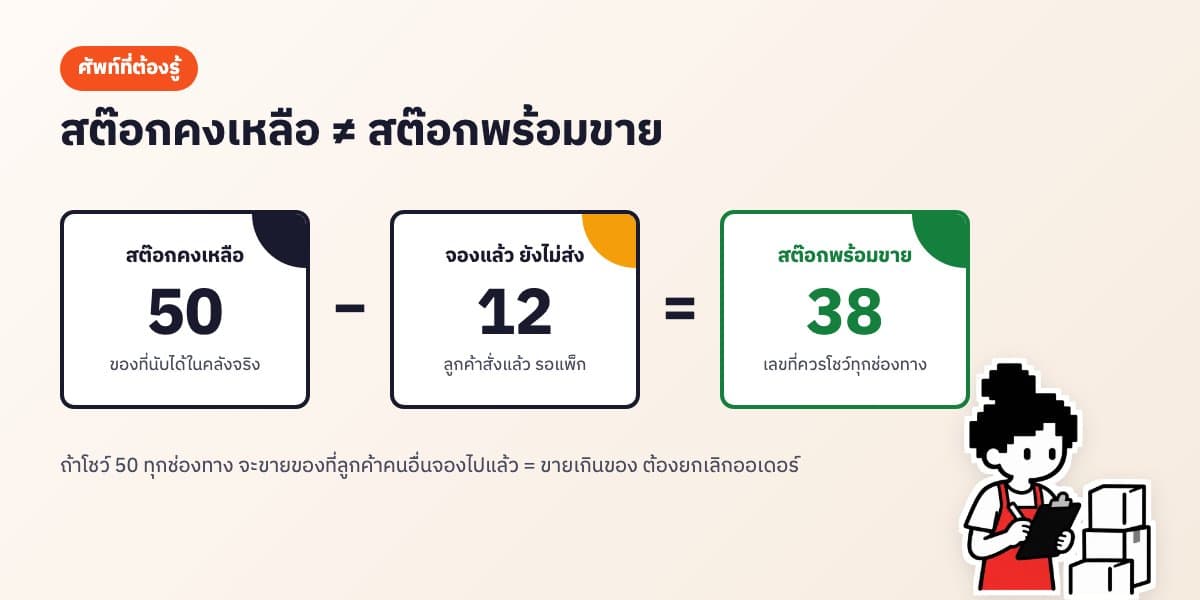
- On-hand stock — what is physically in the warehouse and can be counted by hand
- Available-to-sell stock — on-hand stock minus items customers have ordered but that haven't been packed and shipped yet (reserved). This is the number every sales channel should show
- Reorder point — the minimum level at which you must reorder immediately, so new stock arrives before the current stock runs out
How to set up product codes (SKUs) that are easy to use
A SKU is a code the shop assigns to each product variant, with a separate code for every colour and size. Setting them up well from the start makes searching, counting and making barcodes much easier.
- Start with the product group, then the style, colour and size, e.g. TS-WH-M = T-shirt, white, size M
- Use only English letters, numbers and hyphens — no spaces and no Thai characters
- Keep codes the same length across the shop, and never reuse a code from a discontinued product
- Use the same code on every channel so stock is deducted consistently
A simple way to calculate the reorder point
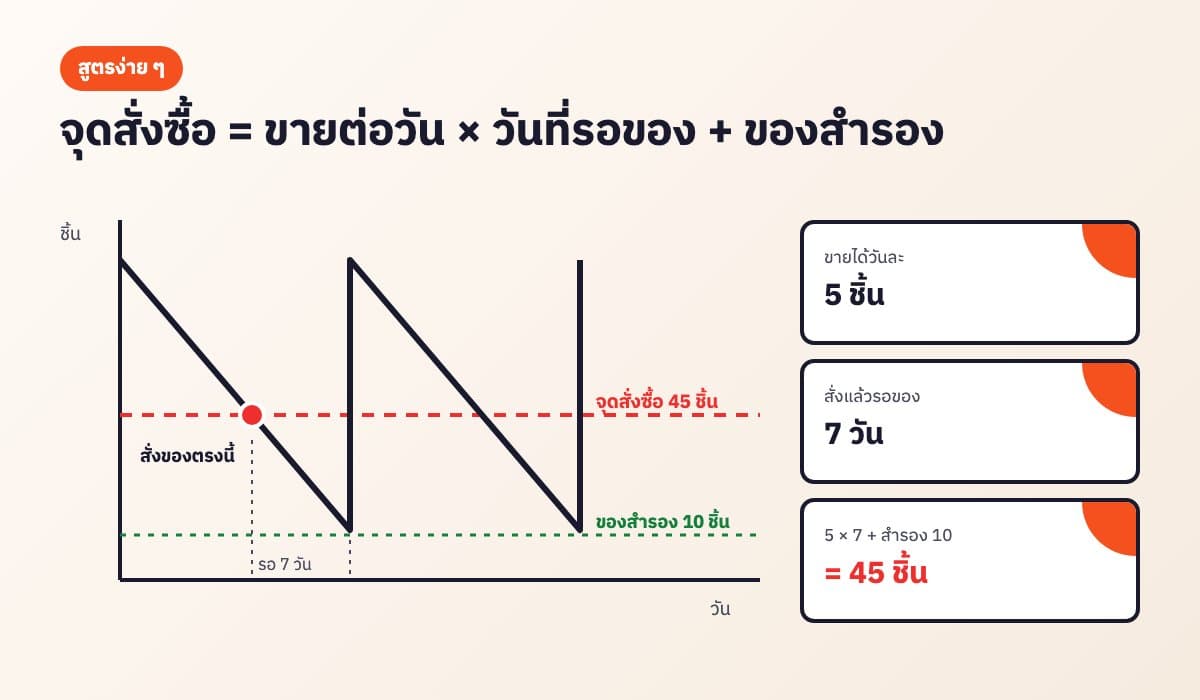
A formula small shops can use right away: Reorder point = average daily sales × days waiting for stock + safety stock
Example: white T-shirts sell 5 a day, the factory takes 7 days to deliver, and you want 10 extra as a buffer in case sales pick up. Reorder point = 5 × 7 + 10 = 45. So whenever you're down to 45, place a new order.
How to do a stock count, step by step
- Pick a time when nothing is coming in or going out, e.g. after you stop taking orders or in the morning before packing
- Print a list of all SKUs with the quantities in your system/file
- Count shelf by shelf and write down the actual quantity (a barcode scanner is faster and causes fewer errors)
- Compare with the file, find the items that don't match and look for the cause, e.g. a return or damaged item that wasn't recorded
- Adjust the figures to match reality, and note the reason every time
You don't need to count the whole shop every day: a full count once a month is enough, but bestsellers and high-value items should be counted every week, because mistakes there cost a lot.
Dead stock costs more than you think
Items that don't sell are money sitting on the shelf. For example, 30 shirts that cost 120 baht each = 3,600 baht tied up, not counting storage space and items deteriorating.
- Every month, check for items with no sales for more than 60–90 days
- Clear them with bundle deals (paired with a bestseller), discounts or as free gifts
- Order less next time, or stop ordering that item
- For items that can expire, sell what came in first, first (FIFO)
5 steps to managing stock for a small shop
- Give every item a SKU, separated by colour and size
- Record every movement: goods received, sales, damaged items, returns — never edit the on-hand number directly without a source
- Set a reorder point for each item and check the "running low" list every week
- Do physical counts on a cycle and adjust the figures to match
- Look for items that haven't moved for more than 60–90 days and run a clearance promotion before they become dead stock
Free tool, no sign-up
Product Barcode Generator
Putting barcodes on products or shelves makes counting faster and reduces typing errors. Create barcodes for free with our barcode generator.
Use the free toolYou can start with Excel for free
Free tool, no sign-up
Excel Inventory Template
If you don't have many products yet and sell on one channel, Excel or Google Sheets is enough. Download our free Excel stock template. The file has a products sheet, a stock in/out sheet and a summary sheet; on-hand quantities, stock value and the "running low" status are calculated for you — just record every item coming in and going out.
Use the free toolExcel vs a stock system: what's the difference?
- Deducting stock — Excel: you type it in for every order · System: whichever channel sells, the central stock is deducted automatically
- Multiple channels — Excel: you have to update quantities on each marketplace one by one · System: quantities are pushed back to every channel
- Several people at once — Excel: file conflicts, numbers easily go wrong · System: everyone sees the same numbers
- Cost — Excel: free · System: both free and monthly paid options
Signs it's time to stop using Excel
- You sell on more than one channel and have to update product quantities everywhere yourself
- You've oversold and had to cancel orders
- Several people help pack orders, but the numbers in the file don't match what's on the shelf
- You have many product options (colour × size) and the file has become long and full of typos
If any of these sound familiar, AooCommerce's inventory system uses one central stock: whichever channel makes the sale, it's deducted in one place. It keeps a history of goods received and issued and alerts you when items are running low. You can start for free.
Frequently asked questions
What's the difference between on-hand stock and available-to-sell stock?+
On-hand stock is what is physically in the warehouse. Available-to-sell stock is on-hand stock minus items customers have ordered but that haven't shipped yet. Every sales channel should show available-to-sell stock.
How often should I count stock?+
For a small shop, a full count once a month is enough, plus a weekly count of bestsellers or high-value items only. After counting, adjust the figures in your file or system to match reality.
How do I calculate the reorder point?+
Average daily sales multiplied by the number of days you wait for stock, plus safety stock. For example, selling 5 a day, waiting 7 days and keeping 10 in reserve gives a reorder point of 45.
What is a SKU and how do I set one up?+
A SKU is a product code the shop assigns to each variant, separate for every colour and size, e.g. TS-WH-M. Use English letters, numbers and hyphens, keep codes unique and use the same code on every channel.
What causes overselling?+
Setting product quantities separately on each channel, so when an item sells on one channel the quantity on another doesn't go down. The fix is a single central stock that deducts for every channel automatically.
What should I do with dead stock?+
Look for items with no sales for more than 60–90 days, then clear them with bundle deals, discounts or as free gifts, and order less next time.
Is there a free Excel stock file?+
Yes. Download AooCommerce's stock template for free at aoocommerce.com/tools/stock-template. It works in both Excel and Google Sheets.
Let the system run the back office. You go relax.
AooCommerce brings chats, orders and stock from every channel together. Sign up free — no card needed.